
Every customer conversation in one inbox
Messages from WhatsApp, Instagram DM, Facebook Messenger, Telegram and the Web Chat on your site come together on Chatopya's Conversations screen. Each customer's history sits on one profile, the AI assistant answers the frequent questions and the results show up in your reports.
Five channels, one Conversations screen
The Conversations screen has tabs for All, WhatsApp, Instagram, Messenger, Telegram and Web Chat. Whatever channel a conversation comes from, it shows up in the same list and is easy to search.
WhatsApp Business API
Your number is connected with Meta approval. Live chat, approved templates and bulk sending in one place.
Instagram DM
Direct messages get their own tab, and the AI assistant can reply there as well.
Facebook Messenger
Messages to your Facebook page land in the same list, and the assistant can work on Messenger too.
Telegram
Connect your Telegram bot; messages arrive in the same inbox as the other channels and your team replies from there.
Web Chat
A chat window added to your site with a short snippet or the WordPress plugin. It answers from the Bot Center knowledge base and passes the chat to an agent when needed.
Instagram comments
Post comments come into the panel, and your team answers them there by hand.
Your team works on one screen
Shared inbox
Conversations from every channel in one list, filtered by channel tab and found by search.
Roles and channel permissions
User roles and per-channel view permissions decide who sees which conversations.
Assignment and handover
Assign a conversation to an agent or hand it over to someone else, on every channel including WhatsApp.
History and summary
Whoever picks up a conversation sees the full thread and the summary the AI prepared.
Intent, sentiment and urgency
Conversations are tagged by intent (order, return/cancellation, information, support, complaint), sentiment and an urgency score.
Organizations
Run several brands or branches as separate organizations.
One profile per customer, every channel on one timeline
The same customer may write on WhatsApp today and on Instagram tomorrow. Chatopya’s CRM module brings those records together, so agents see who they are talking to at a glance.
Single customer profile
When the phone number or channel ID matches, WhatsApp, Instagram, Messenger, Telegram and Web Chat records merge into one profile.
Cross-channel timeline
All of a customer’s conversations across channels line up on one timeline.
Contact merging
Automatic merge suggestions, manual merging and undo when needed.
Custom fields, tags and notes
Add your own fields, tags and notes to the customer profile.
Contact lists and Excel
Build contact lists for campaigns and import or export them with Excel.
Meta lead forms
People who fill in a Meta ad form are passed into Chatopya.
The AI assistant works inside the channels
The assistant takes the frequent questions, your team the rest
On WhatsApp the assistant works from the instructions you write and the API tools you define; it can also be switched on for Instagram, Messenger and Telegram. The Web Chat on your site answers from the FAQs, texts and pages you add to the Bot Center. Anything it cannot resolve goes to your team with the history.
- You choose when it steps in
- Replies in the language the customer writes in
- Summary and estimated satisfaction score at closing

How does a conversation move through the panel?
A message arrives
Whichever channel it comes from it lands in the same inbox.
The assistant replies first
The assistant answers from your instructions or the Web Chat knowledge base; the conversation is tagged with intent, sentiment and urgency.
Your team takes over
When needed, the conversation passes to your team with summary and history.
The result is reported
The conversation is ended; distributions and resolution time are followed in reports.
Reports from your conversations
See what customers want and how they feel
The sentiment and intent report shows resolution rate, average resolution time and estimated satisfaction, and lists the most frequent mood shifts. The agent performance report, satisfaction survey results, delivery reports, Instagram insights and the Meta ads report sit in the same panel.
-
Sentiment breakdown
The share of angry, worried or happy customers.
-
Intent breakdown
How conversations split across orders, returns, information, support and complaints.
-
Delivery status
Sent, delivered and read WhatsApp messages.
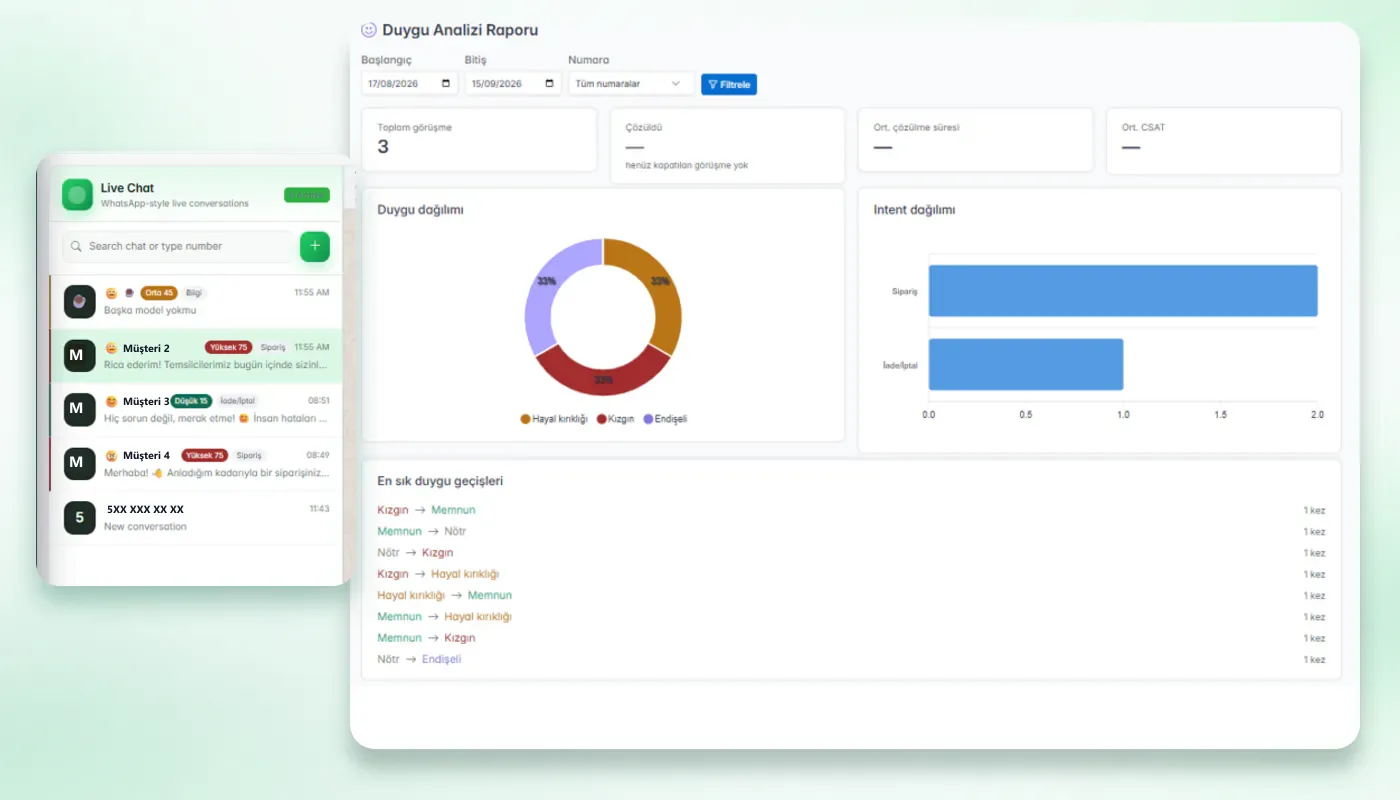
Example: an angry customer
A customer writes: “My order has not arrived in two weeks, I am very angry.”
The conversation is tagged with intent (complaint), sentiment and a high urgency score, so it moves up the list. The agent reads the summary, sees what the bot wrote, carries on and closes the conversation once it is solved. The mood shift and resolution time show up in the report.
Limits you should know
On WhatsApp you can reply freely within 24 hours after the user writes; after the window closes only Meta-approved template messages can be sent.
On Instagram only business accounts linked to a Facebook page can be connected.
The bot only answers from the information you add; out-of-scope questions go to an agent.
Pricing has two items: Chatopya's monthly package fee and Meta's per-message fee.
Instagram comments
There are no AI replies to Instagram comments; you answer comments by hand in the panel.
What else is in the same panel?
Frequently asked questions
Which communication channels are supported?
WhatsApp, Instagram DM, Facebook Messenger, Telegram and Web Chat.
Can several people work at the same time?
Yes. Depending on your plan you set up 1, 5 or 25 users, with no limit on Enterprise. Conversations are assigned to agents and can be handed over to someone else, on every channel. User roles and channel permissions decide who sees what.
How does tagging work?
Conversations are marked with intent, mood and urgency score so priority conversations stand out in the list.
Which reports are there?
The agent performance report, satisfaction survey results, the Sentiment Analysis Report (mood and intent distribution, average resolution time, satisfaction indicators) and a sending dashboard with sent, delivered and read counts.
What campaign and automation features exist?
Segmented WhatsApp bulk sending and scheduling with approved templates, WhatsApp Flows, the Web Chat flow editor and the AI assistant.
Do Instagram comments land in the inbox too?
Comments are listed with their post on a separate screen in the panel and answered there by hand. There are no automatic or AI replies to comments.
Can I see a customer’s full history?
Yes. The customer profile shows that person’s WhatsApp, Instagram, Messenger, Telegram and Web Chat conversations on one timeline.
Let's set up the panel for your team together
In a 30-minute demo we show the product live on your own scenario.