
AI marketing, from ad to conversation, in one panel
Running ads in Meta, broadcasts in another tool and Instagram from your phone eats up the week. In Chatopya you build Meta ads by chatting with AI, send approved WhatsApp broadcasts, and manage Instagram posts and insights from the same panel. Leads from your ad forms land straight in the CRM.
What slows small marketing teams down
Ads Manager is a maze
Campaign, ad set, creative, targeting. For anyone who isn't a specialist, every new ad turns into a project.
Tools that don't talk to each other
Ads in one place, WhatsApp broadcasts in another, Instagram on your phone. Pulling it together is left to you.
Leads go cold
Form leads sit in a spreadsheet nobody checks. By the time you call, they've already talked to someone else.
Ads, messaging and social in one place
Create Meta ads by chatting
Type “Start a traffic campaign for the new collection, women 25-40” and the assistant drafts the campaign, the ad set (daily budget, age, gender, objective) and an image or carousel creative, with a preview.
Manual campaign management
Create, edit, pause or delete campaigns, build lead forms and upload videos.
Performance reporting
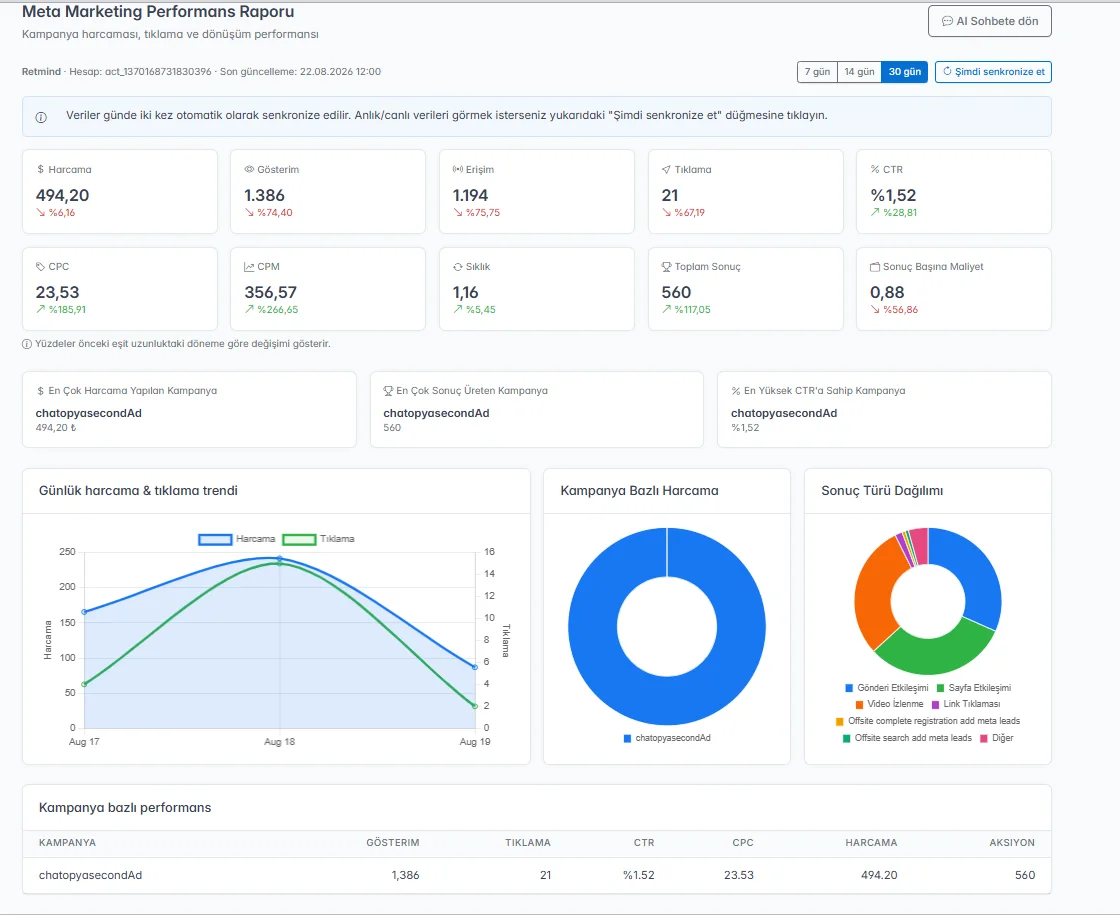
Impressions, clicks, spend, CTR, CPC and actions sync daily, with trends against the previous period. Ask the AI and it explains the numbers in the chat.
Performance tracking, changes on your approval
The AI keeps an eye on ad performance, points out problems and opportunities, and suggests what to do. Budget changes, pausing or starting an ad happen only when you approve them. Meta's own system handles delivery for the campaign objective you chose.
WhatsApp broadcasts and scheduling
Segment opted-in customers by tag, order history or interests and send them Meta-approved template messages. Schedule them for later and track delivery and read status.
Instagram posts, comments and insights
Publish posts, read and reply to comments in the panel, and follow reach and follower insights.
Lead forms into the CRM
Contacts from your Meta lead forms flow into Chatopya's customer module, where your team follows up.
How to get started
Connect your Meta ad account
Sign in with Facebook (OAuth) to connect your ad account. No passwords shared.
Build your first campaign in the chat
Describe the goal, budget and audience. The assistant drafts it, you review the preview and decide.
Prepare your WhatsApp template
Submit the template for Meta approval, pick your recipient list and set the send time.
Track everything in one place
Ad reports, delivery status and Instagram insights in the same panel.
One campaign week
A boutique wants to promote its weekend sale with ads and on WhatsApp.
On Monday the team describes the sale to the Meta Marketing assistant. It drafts a traffic campaign, an ad set targeting ages 18-45 and a carousel creative; the team checks the preview and publishes. On Thursday evening a WhatsApp template is scheduled for opted-in customers. On Friday the team looks at clicks and spend in the report and asks the assistant which ad is doing better. The assistant explains the numbers and suggests cutting the budget of the weaker ad. Once the team approves, the change goes live.
Lead form submissions start coming in.
The data lands in the CRM. The team adds the contacts to a list and follows up; later the same list becomes a recipient group for WhatsApp broadcasts.
Someone comments “How much?” under the campaign post.
The comment appears in the panel and your team replies from there. There are no automatic or AI replies to comments; this stays manual.
What it doesn't do (yet)
- There's no side-by-side campaign comparison screen; the report shows trends against the previous period.
- No drip sequences; each broadcast is planned on its own.
- There's no per-ad attribution for conversations that come from Click-to-WhatsApp ads.
- There's no Google Ads integration right now; only Meta (Facebook and Instagram) ad accounts can be connected.
- Broadcasts follow Meta's daily messaging limits and quality rating, and every template needs Meta approval.
Frequently asked questions
Can't find what you're looking for? Write to our team and we'll get back to you the same day.
Ask a questionWill the assistant publish ads without my approval?
The assistant drafts the campaign and shows you a preview. Budget changes and pauses also happen only with your confirmation.
Does the AI optimize ads on its own?
No, the AI doesn't change anything on its own. It monitors ad performance, flags problems and opportunities, and suggests what to do. Budget changes, pausing or starting are applied once you approve them, so your spend never changes without your say-so. Delivery for the campaign objective you choose is optimized by Meta's own system.
How many people can I message on WhatsApp?
As many as Meta's daily limit for your number allows. That limit rises in tiers based on quality rating and sending history. Details are on the bulk messaging page.
Can I manage Google Ads too?
Not at the moment. Chatopya only connects Meta (Facebook and Instagram) ad accounts.
Where does lead form data go?
Into Chatopya's customer module, where you can add contacts to lists, tag them and leave notes. The customer module isn't part of every plan; see the pricing page.
Let's set up your next campaign together
In a 30-minute demo we walk through it live, using your own ad account and WhatsApp use case.