
Chatopya Mobile: customer messages in your pocket, not stuck on your desk
In the store, on site or on the road, you see it when a customer writes. Your team follows, takes over and answers conversations on iPhone and iPad, so customers don't wait just because nobody is at a desk.
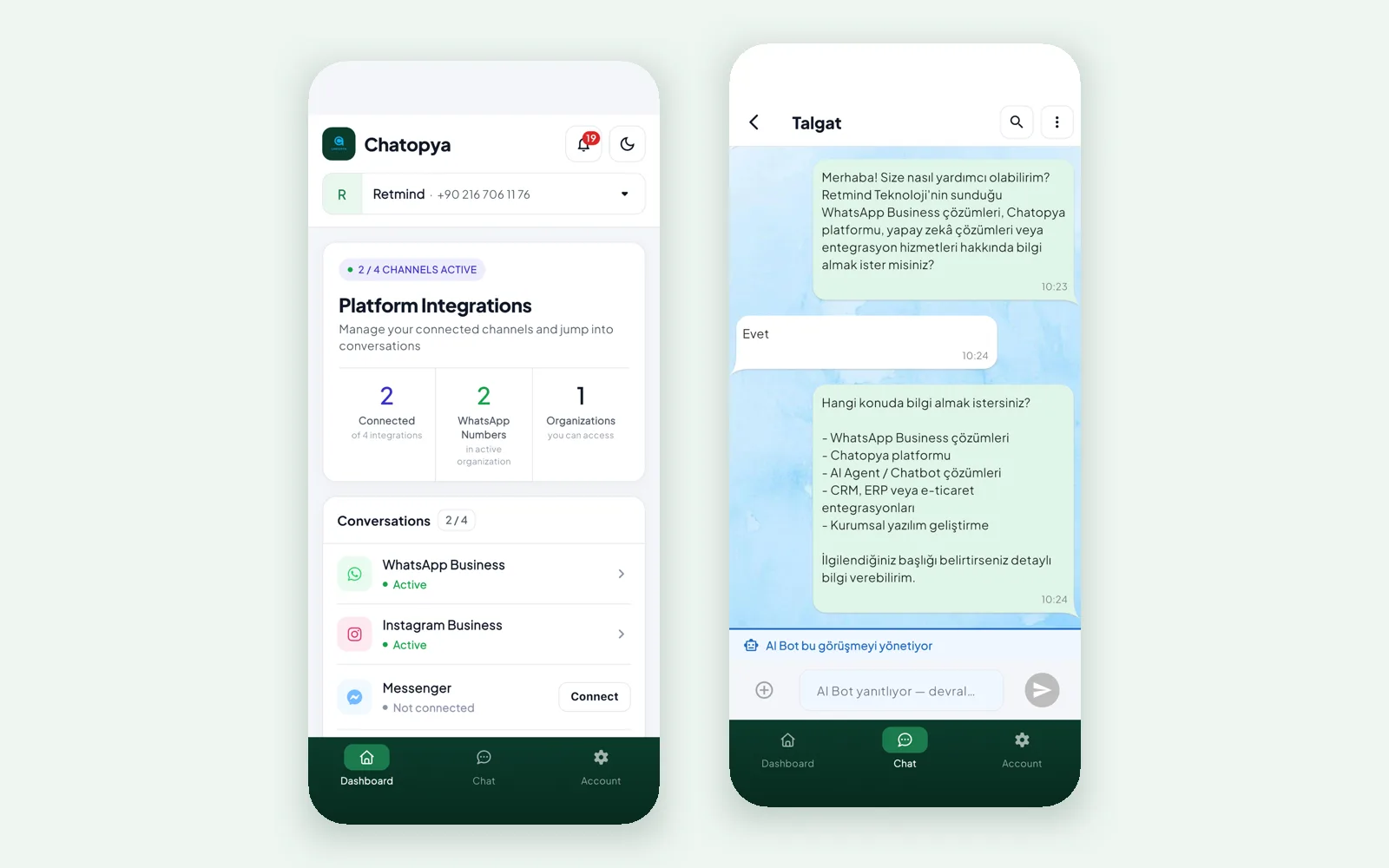
Your inbox goes with you
Channels in tabs
WhatsApp, Instagram, Messenger and Web Chat conversations each have their own tab. If you run several WhatsApp numbers, you pick the number.
Take over from the bot in one tap
When the AI bot is handling a conversation, the screen shows it. If needed, take over in one tap and carry on where it left off.
Unread, favourites, groups
Filters show waiting conversations first, and you can mark important customers as favourites.
Notifications and channel overview
The home screen shows notifications, connected channels and your WhatsApp numbers. If you have access to several organizations, you switch between them.
History at hand
See the customer's earlier conversations as you reply, so you never ask the same thing twice.
The team stays in sync
Agents at the desk and colleagues in the field see the same conversations, so it's clear who is handling what.
Getting started
Download the app
Install Chatopya Mobile on your iPhone or iPad from the App Store.
Sign in
Sign in with the email and password of the Chatopya account you use in the panel.
Start answering
Conversations assigned to you and those waiting show up in the list.
A typical day
The store owner is at a trade fair when a customer asks about wholesale prices on Instagram DM.
The assistant shares the general details and leaves the conversation for the team. The owner opens it on her phone, sees last month's order and writes the quote right there. Back at the office, the conversation is in the panel just where she left it.
What it doesn't do (yet)
- Chatopya Mobile is available for iPhone and iPad only for now. On Android, use the panel in your phone's browser.
- Admin work such as campaigns, ads and bot flows is easier in the panel.
- Meta's 24-hour rule applies in the app too: once the window closes, you can only send an approved template.
Frequently asked questions
Can't find what you're looking for? Write to our team and we'll get back to you the same day.
Ask a questionDoes Chatopya Mobile cost extra?
You download it from the App Store and use it with your Chatopya account. The number of users depends on your plan; details are on the pricing page.
Is there an Android app?
Not yet. On Android, open the panel in the browser.
Which channels can I see?
WhatsApp, Instagram, Messenger and Web Chat conversations, each in its own tab.
Is this the same as the WhatsApp Business app?
No. Chatopya Mobile manages conversations on your WhatsApp Business API number together with your team; several agents can reply from the same number.
Let's set up mobile work for your team
In a 30-minute demo we show the panel and Chatopya Mobile with your own channels.