Manage all customer conversations from one panel
For customer service teams: WhatsApp, Instagram DM, Messenger, Telegram and Web Chat in a single inbox. Conversations are distributed to agents, tagged by topic and urgency and the results followed in reports.
What is in multi-channel communication?
Supported channels
WhatsApp, Instagram DM, Facebook Messenger, Telegram and the Web Chat on your site.
Shared inbox
Conversations from all channels are in the same list and can be found with search.
Teamwork
You assign a conversation to an agent, take it over, hand it back to the bot or end it.
Conversation history
When an agent takes over they see the whole exchange and the summary prepared by the bot.
Tagging and classification
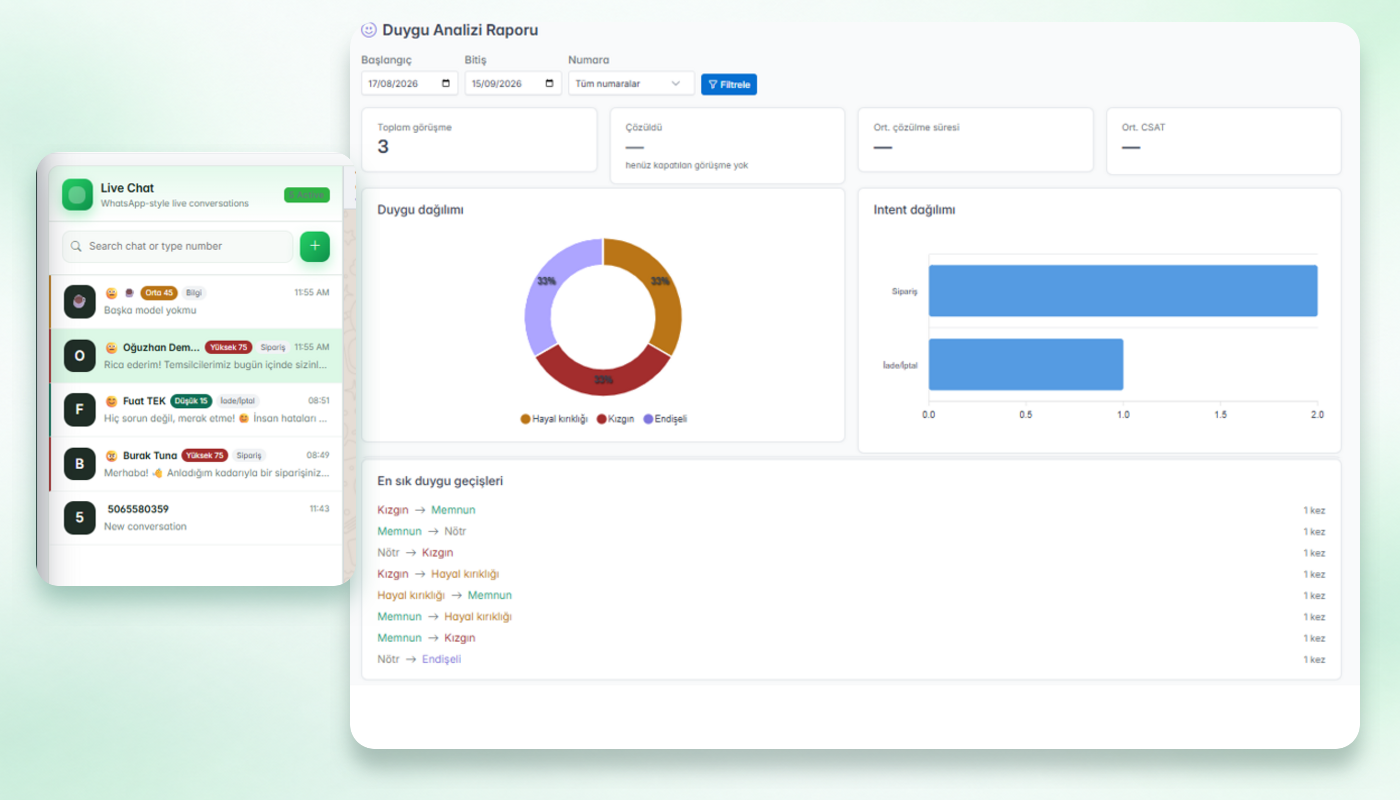
Conversations are marked by intent (order, return/cancel, information, support, complaint), mood and urgency score.
Reporting
Sentiment Analysis Report: mood and intent distribution, average resolution time and satisfaction indicators. A sending dashboard for sent, delivered and read messages.
How does a conversation move through the panel?
A message arrives
Whichever channel it comes from it lands in the same inbox.
The bot gives the first answer
Questions in the knowledge base are answered; the conversation is marked with intent, mood and urgency.
An agent takes over
When needed an agent continues with the summary and history.
The result is reported
The conversation is ended; distributions and resolution time are followed in reports.
Example: an angry customer
A customer writes: “My order has not arrived in two weeks, I am very angry.”
The conversation is marked with intent (complaint), mood and a high urgency score and stands out in the list. The agent reads the summary, takes over, sees what the bot wrote and ends the conversation once solved. The mood transition and resolution time appear in the report.
Limits you should know
- On WhatsApp you can reply freely within 24 hours after the user writes; after the window closes only Meta-approved template messages can be sent.
- On Instagram only business accounts linked to a Facebook page can be connected.
- The bot only answers from the information you add; out-of-scope questions go to an agent.
- Pricing has two items: Chatopya's monthly package fee and Meta's per-message fee.
Frequently asked questions
Can't find what you're looking for? Write to our team and we'll get back to you the same day.
Ask a questionWhich communication channels are supported?
WhatsApp, Instagram DM, Facebook Messenger, Telegram and Web Chat.
Can several agents work at the same time?
Yes. Conversations are assigned to agents; each conversation shows which agent or bot is handling it.
How does tagging work?
Conversations are marked with intent, mood and urgency score so priority conversations stand out in the list.
Which reports are there?
The Sentiment Analysis Report (mood and intent distribution, average resolution time, satisfaction indicators) and a sending dashboard with sent, delivered and read counts.
What campaign and automation features exist?
Segmented WhatsApp broadcast campaigns with approved templates, no-code conversation flows and an AI bot.
Let's set up the panel for your team together
In a 30-minute demo we show the product live on your own scenario.